 Alpen
Getting Started
Install Alpen on Your Phone
Why There’s No App Store App
Alpen does its best to make capturing ideas and tasks as fast as possible. In the age of short attention spans, I have noticed myself and friends lose their train of thought faster than before, which means that Alpen needs to allow you to jot things down quickly before you forget them. One thing that would go a long way in helping with that are native mobile apps that you can download in the App Store or Google Play, however as a solo developer of this project. I do not have the time to be able to create one that is up to the standard that I want. While that remains the case, Alpen Planner does have a Progressive Web App (PWA) that we have. All this means is that it’s something that’s closer to a mobile app (you can click on an app icon)
Alpen is something I build on my own, outside a full time job. I do it because I believe it helps me stay sane and more organized but as with anyone, time is limited. Introducing a native app at this stage, even when I think the browser has a lot more work to be done, would be irresponsible. A native mobile app is a second product (a third if you consider one for Apple and one for Android), more codebases in another programming language. Ensuring that the features always are up to date becomes its own job as well. Every change means a new release for multiple mobile apps. These are costs that are manageable but not yet.
A Nice Middle Ground
What Alpen has instead is a Progressive Web App (PWA): a website, installed onto your phone like an app. It gets an icon on your home screen, opens full screen without the browser’s address bar, and has a bottom bar built for your thumb.
Because it’s the same Alpen you use on your computer, there’s nothing to keep in sync and nothing to update. A todo you add on the go is on your agenda when you sit down, a fix I ship is on your phone the next time you open it, with no App Store review in between.
The mobile apps focus is:
- For you to be able track things on the go
- Add notes to existing todos
- Glance at your agenda/calendar
A Brief History of Web Apps
Installing a website is older than the App Store. When Steve Jobs introduced the iPhone’s software in 2007, web apps were the plan for third-party apps: build a website, and people would save it to their home screen. Developers wanted more than the web could do back then, and the App Store opened a year later.
The web kept catching up. In 2015 Google engineers Alex Russell and Frances Berriman coined the name “Progressive Web App” for sites that can be installed, work offline and behave like apps. Android and Chrome embraced the idea first. Safari followed more slowly: iOS 11.3 (2018) brought the pieces that make an installed site work like an app, iOS 16.4 (2023) let installed web apps send notifications, and since iOS 26 every site you add to your home screen opens as a web app by default.
iPhone and iPad
Use Safari.
- Go to alpenplanner.com and sign in.
- Tap the ⋯ button next to the address bar, then Share. On older iPhones, tap Share (the square with an arrow pointing up) directly.
- In the Share sheet, tap View More.
- Tap Add to Home Screen.
- Keep Open as Web App on, and tap Add.
- Alpen is now on your home screen. Tap it to open it full screen.

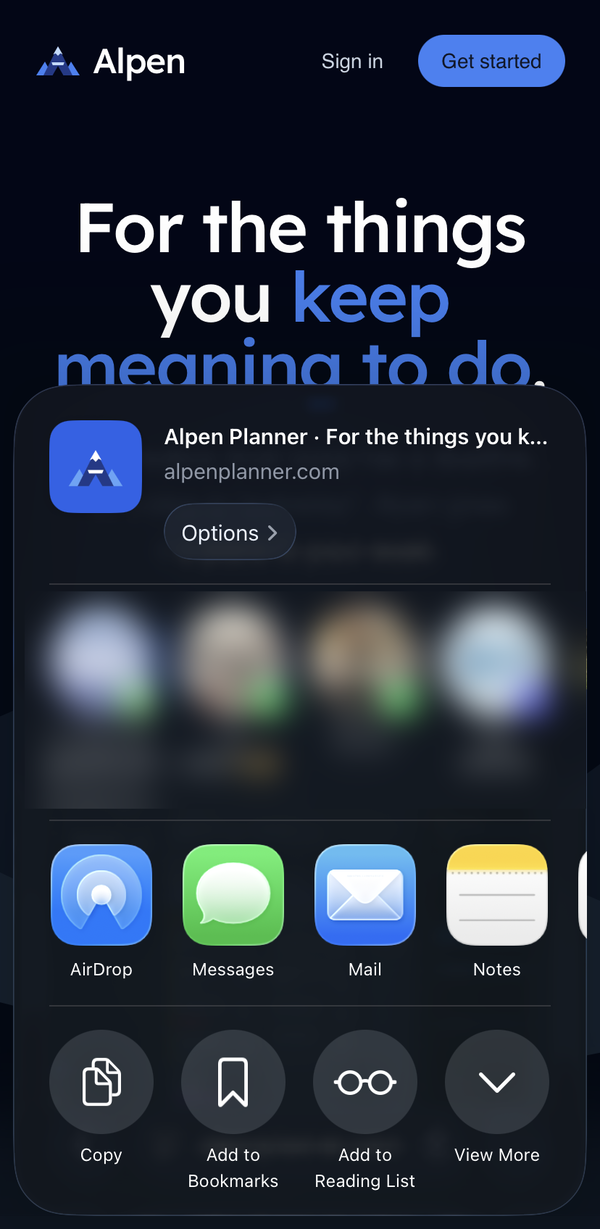
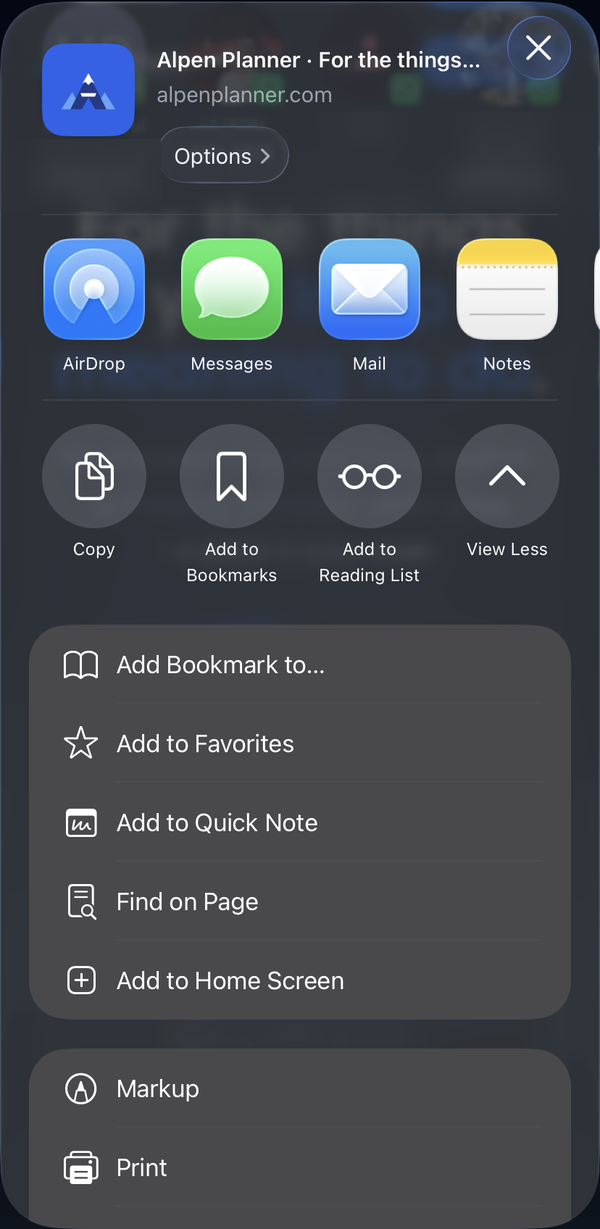
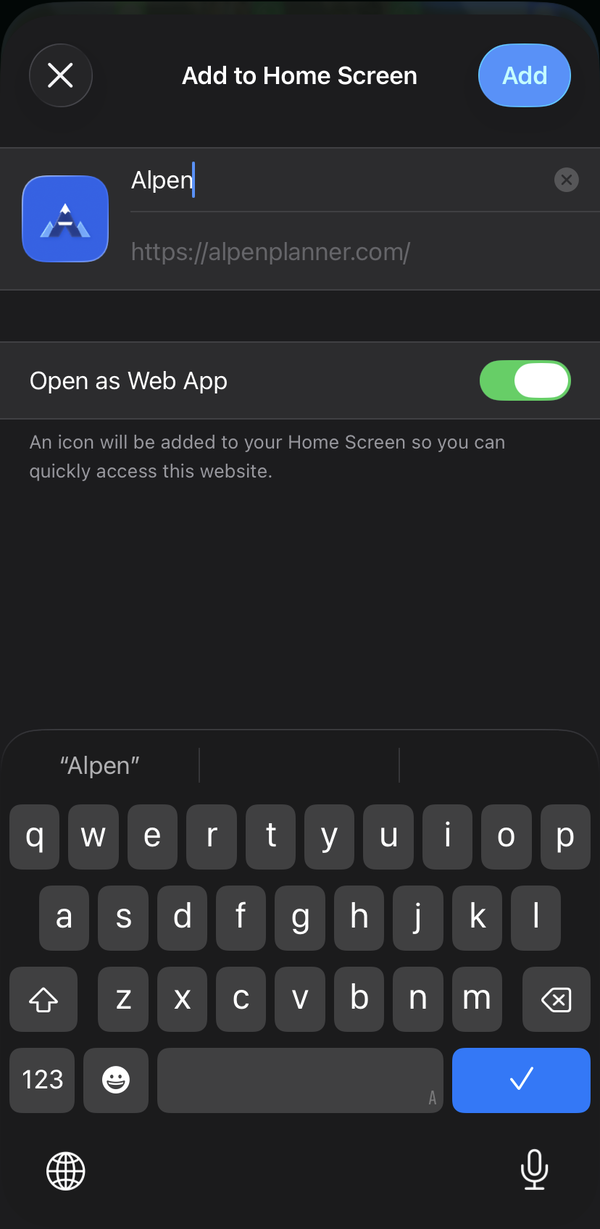

Safari has no install button of its own for websites, so this is the only way. It also works from Chrome and Edge on iPhone, through their Share menu.
Android
Use Chrome.
- Go to alpenplanner.com and sign in.
- Tap ⋮, top right.
- Tap Add to Home screen, then Install.
Chrome may offer an Install Alpen button itself. You’ll also find one in Alpen, under Settings › Phone app: tap it and confirm.
Capture on the Go
Hopefully with this installed, you get the ability to add todos as you go, add notes, and look at your agenda. And leave feedback on how we can help make your routine more fluid. Feel free to email me at support@alpenplanner.com.
Troubleshooting
Unable to use a password manager
There is an known iOS issue where some interactions are buggy. In my case, it wouldn’t let me use my password manager application to login. In these cases you can remove the PWA temporarily. Sign into Alpen on the browser (Safari) then install the PWA as the instructions above show.